
Browser extension for Chrome & Edge
Feedback right on the website — not in 40 emails.
Shift+click any section, text or image and comment exactly where it belongs. Clients, editors and developers see the same markers, reply in the thread and tick things off.

- Works instantly, no account
- No subscription
- Invitees pay nothing
Features
Everything for a clean website review. Nothing in the way.
No screenshot ping-pong, no "top right, the second image" descriptions. markable attaches every piece of feedback to the element it is about — and finds it again after changes.
Comment with Shift+click
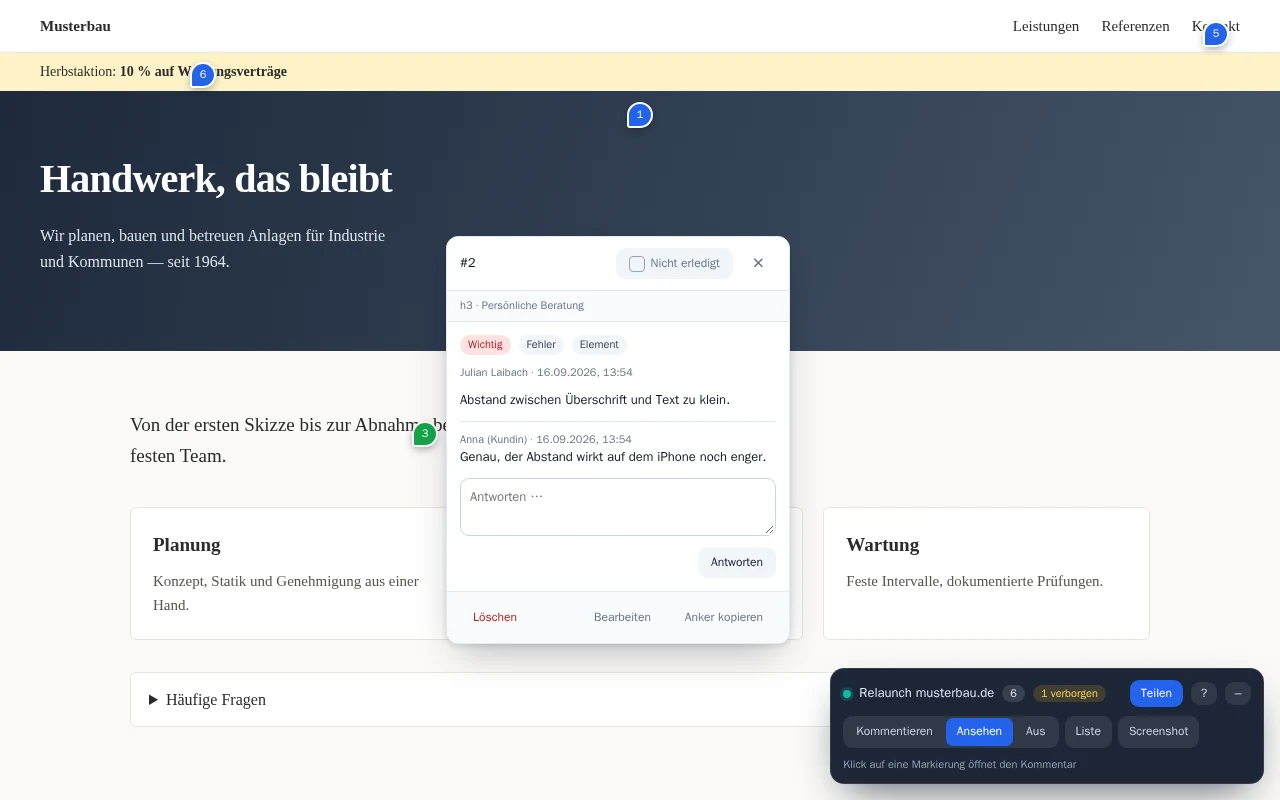
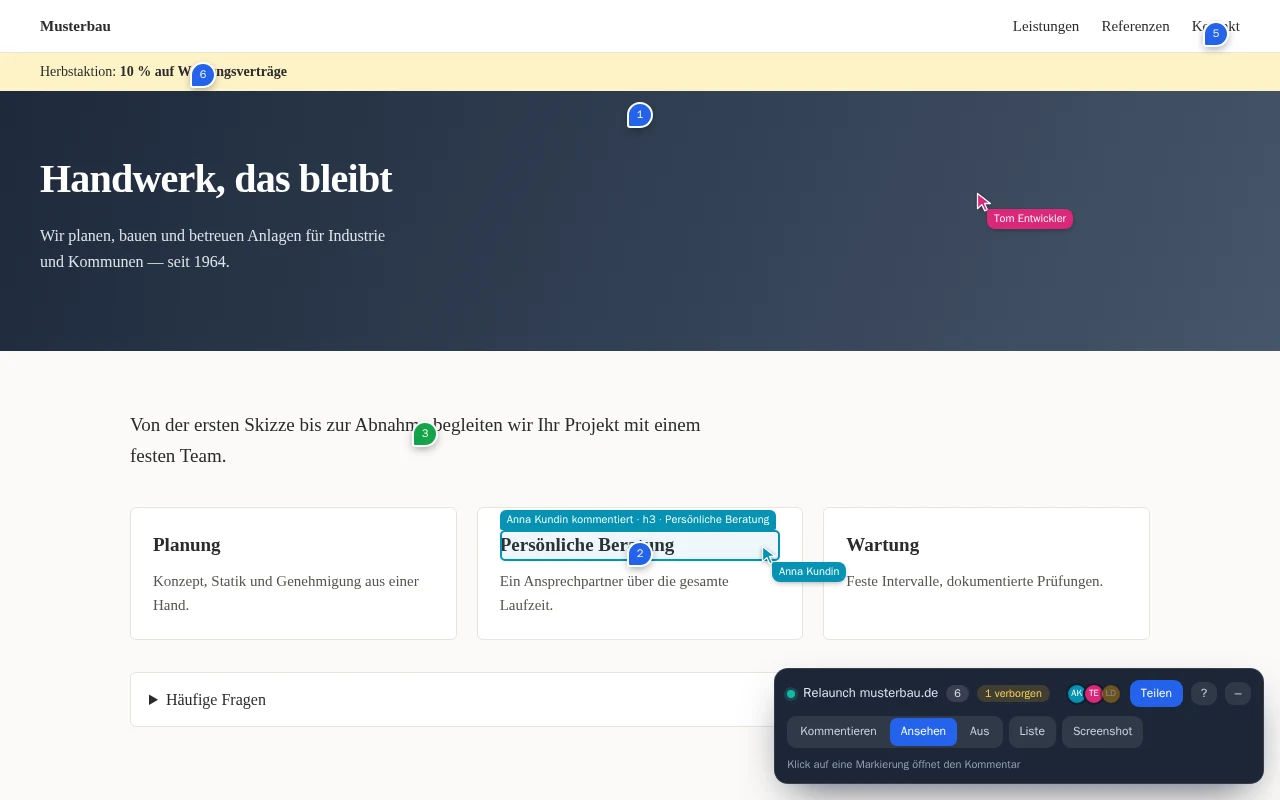
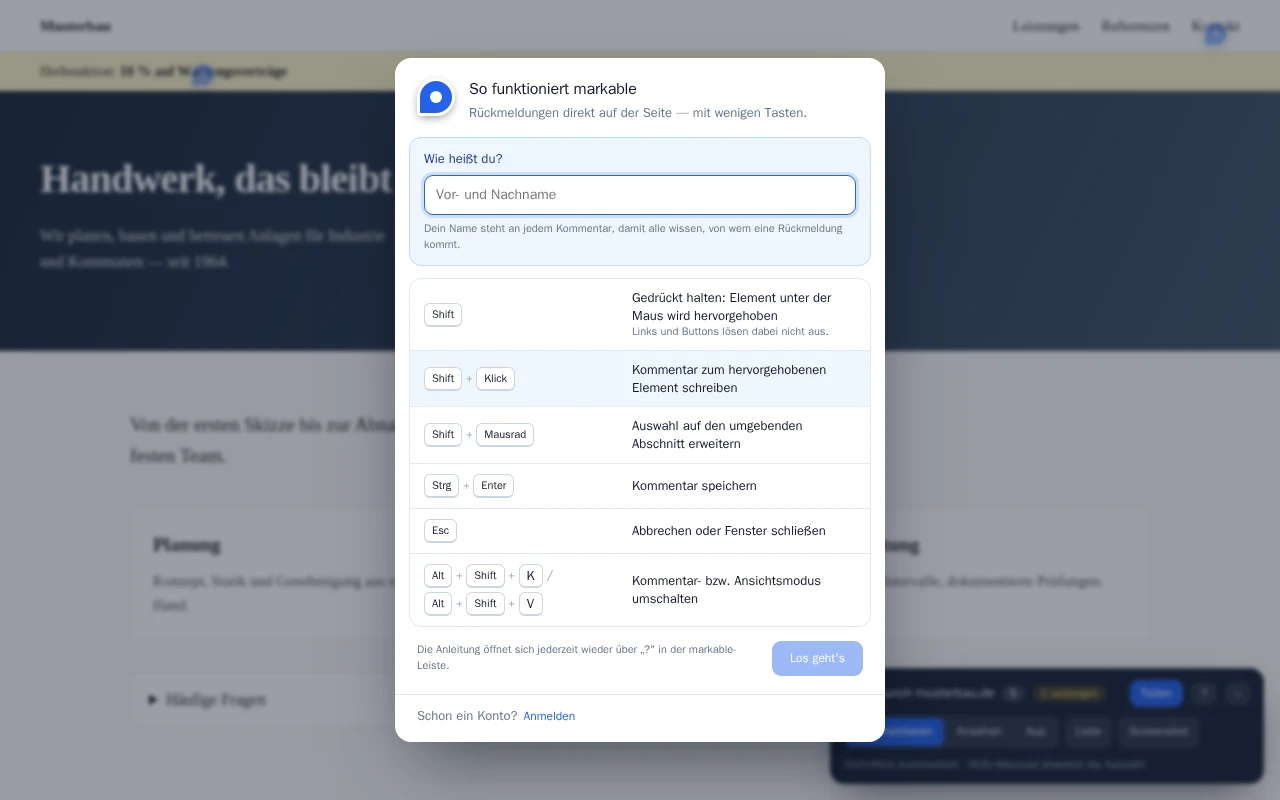
Hold Shift to highlight the element under the cursor, Shift+scroll to widen to the whole section, Shift+click to open the comment box. Selected text is saved as a quote.
Real-time collaboration
In shared projects everyone sees the same comments instantly — including the cursors and selections of the others. Reply, resolve, move on.
Anchors that hold
Comments do not store pixels but a chain of element features. When the layout changes, markable still finds the element.
Full-page screenshot
The entire page as PNG or as a PDF report with numbered markers and all comments — ready to forward.
Overview and export
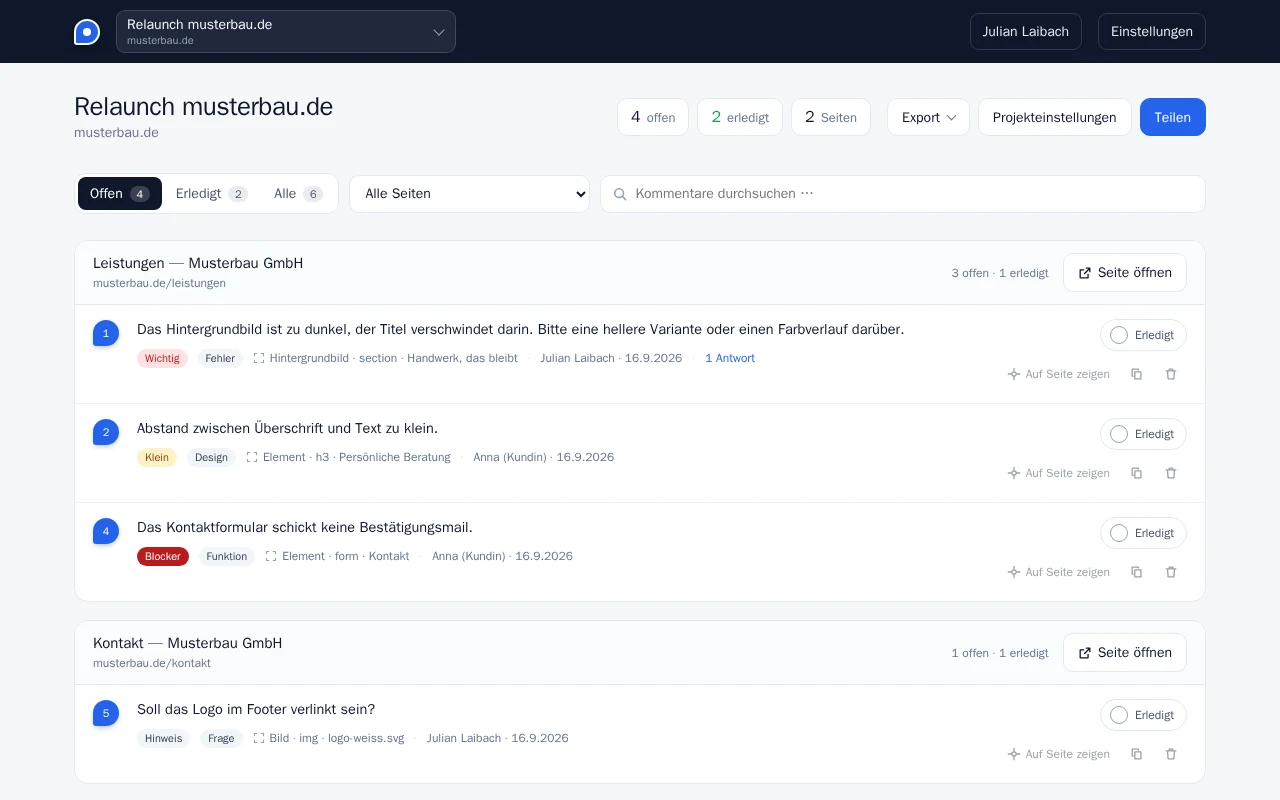
All feedback grouped by page, with filters, search and status. Export as JSON, Markdown or CSV — straight into your issue tracker.
How it works
From relaunch to sign-off in three steps.
Install the extension, open the page, get started. Without an account everything stays local in your browser.
-
Create a project
On the page you want to review, click the markable icon and create a project. The domain is remembered — markable can start there automatically next time.
-
Comment
Highlight an element with Shift, click, write, save. Set a category and priority — from "note" to "blocker".
Shift Click
-
Review and resolve
View mode shows every comment as a numbered marker. Click to open the thread: reply, edit, done.
Alt Shift V
Shortcuts can be changed at chrome://extensions/shortcuts.
Product tour
Feedback nobody can misunderstand.
From the first click to sign-off, everything stays where it belongs.
Who it's for
For everyone who signs off websites — on both sides.
Agencies
Clients comment themselves, right on the staging site. No Word documents full of screenshots, no call notes.
For agenciesFreelancers
Professional sign-offs without a tool subscription: free locally, sharing once per project.
For freelancersMarketing teams
Comment on copy, images and buttons right on the landing page — with quote, priority and tick.
For marketing teamsDevelopers
Every piece of feedback with element, selector, page and viewport. Export as CSV or JSON into your issue tracker.
For developersPricing
Pay once. Share for good.
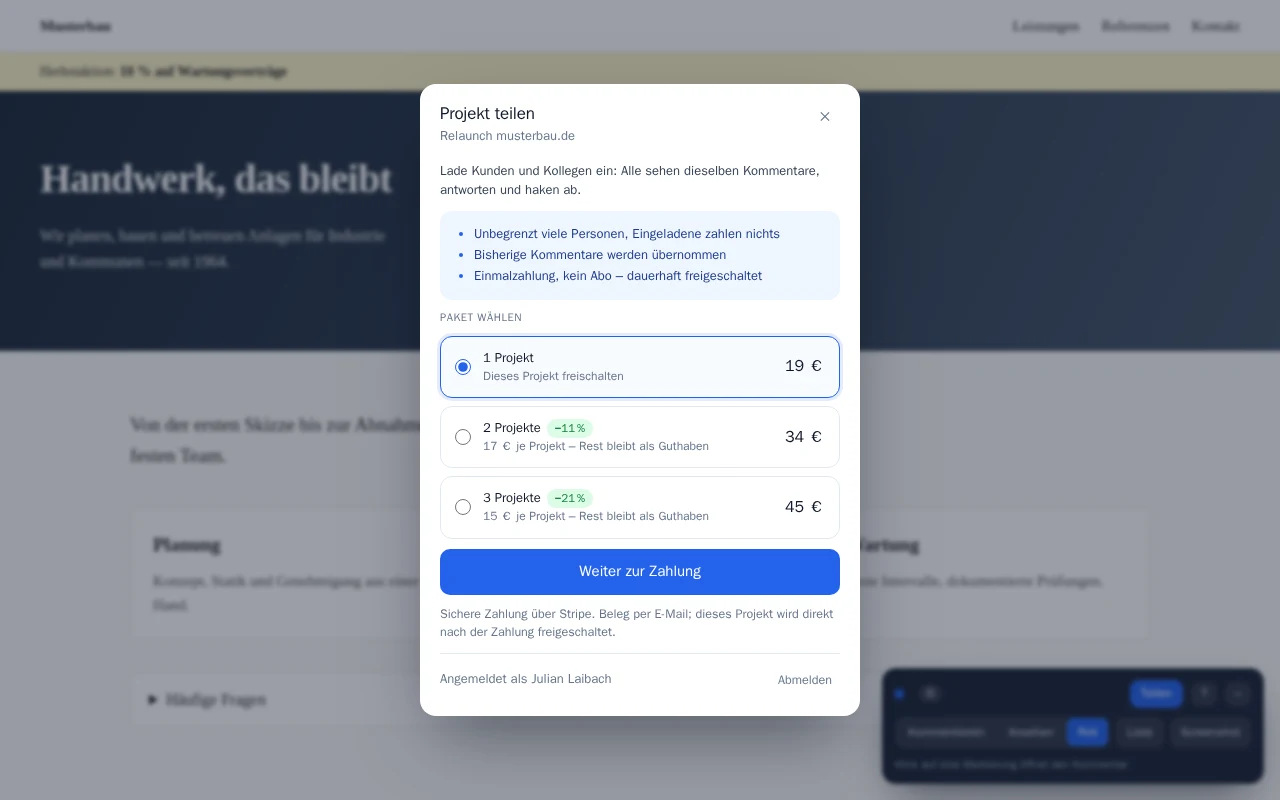
On your own and locally, markable is free. To share a project with others, unlock it once — no subscription, no expiry, for up to 10 guests.
Local
For your own review, no account.
€0
forever
- Unlimited projects and comments
- Screenshots as PNG and PDF
- Export as JSON, Markdown, CSV
- Data stays in your browser
1 project
Unlock one project for sharing, permanently.
€19
one-time
- Invite up to 10 guests
- Real-time collaboration
- Custom categories in the project
- No subscription, no expiry
2 projects
−11%For the relaunch and the next project.
€34
€17 per project
- Everything in "1 project"
- Redeem unlocks later
- The rest stays as credit
3 projects
−21%For agencies with ongoing projects.
€45
€15 per project
- Everything in "1 project"
- Redeem unlocks later
- The rest stays as credit
- Invitees pay nothing
- Secure payment via Stripe
- Receipt by email
- Prices incl. taxes
Frequently asked questions
No. Without an account markable works entirely locally in your browser. You only need an account to share a project with others or to accept an invitation. Sign in with Google, Microsoft, Apple or an email code.
No. Whoever creates a project unlocks it and invites others. Invitees join for free — up to 10 guests per project with an unlock.
No. An unlock is a one-time payment and stays valid for the project. Unused unlocks from the packages remain as credit in your account.
Google Chrome (version 116 or later) and Microsoft Edge, as well as other Chromium-based browsers. Install markable from the Chrome Web Store — in Edge you can add it from the Chrome Web Store as well.
Comments do not store a pixel position but a chain of element features. If markable can only find an element with uncertainty, the marker is shown dashed; if it finds nothing, the comment is kept with a "not found" note. No feedback gets lost.
Without an account, only in your browser. Shared projects are stored on our server so that everyone involved sees the same comments. Details are in the privacy policy.
Your next review will be your most relaxed one.
Install, open the page, Shift+click. Questions? We are happy to help.